Back to Blog

Product

BAFTA Slip - A Case for Smarter Editing

BAFTA Slip - A Case for Smarter Editing

Live TV Doesn't Forgive

The 2026 BAFTA Film Awards caught Lola Young's ecstatic and unfiltered Grammy acceptance speech - live broadcasts have a habit of delivering moments nobody planned for.

An audience member with Tourette's syndrome shouted a racial slur while ‘Sinners’ stars Michael B. Jordan and Delroy Lindo were presenting on stage. The BBC, broadcasting live, failed to censor it in time. The result? A formal apology, a ruling that the broadcast breached the BBC's own editorial standards.

Then at the Grammys, Lola Young's first Grammy win was accompanied by an enthusiastic f-bomb that slipped past CBS censors on YouTube TV. Two incidents - with shared consequences: profanity streaming out live to millions.

The media industry needs better tools across the board, not just at the broadcast stage. When the unpredictable happens live, the editors picking up the pieces afterwards need to be able to move fast, accurately, and cleanly.

Post-Production Rush

When something like this happens, every outlet, podcast, and content creator covering the story faces the same problem: Highlight reels need cutting. Clean versions need producing, sometimes all at once, under tight deadline.

The traditional way of handling this is painful. You load the footage, you listen back, you find the moments, you cut manually, you check again. For two or three hours of raw broadcast material, that process alone can take hours before you've even started building the actual story edit.

Start with the Words

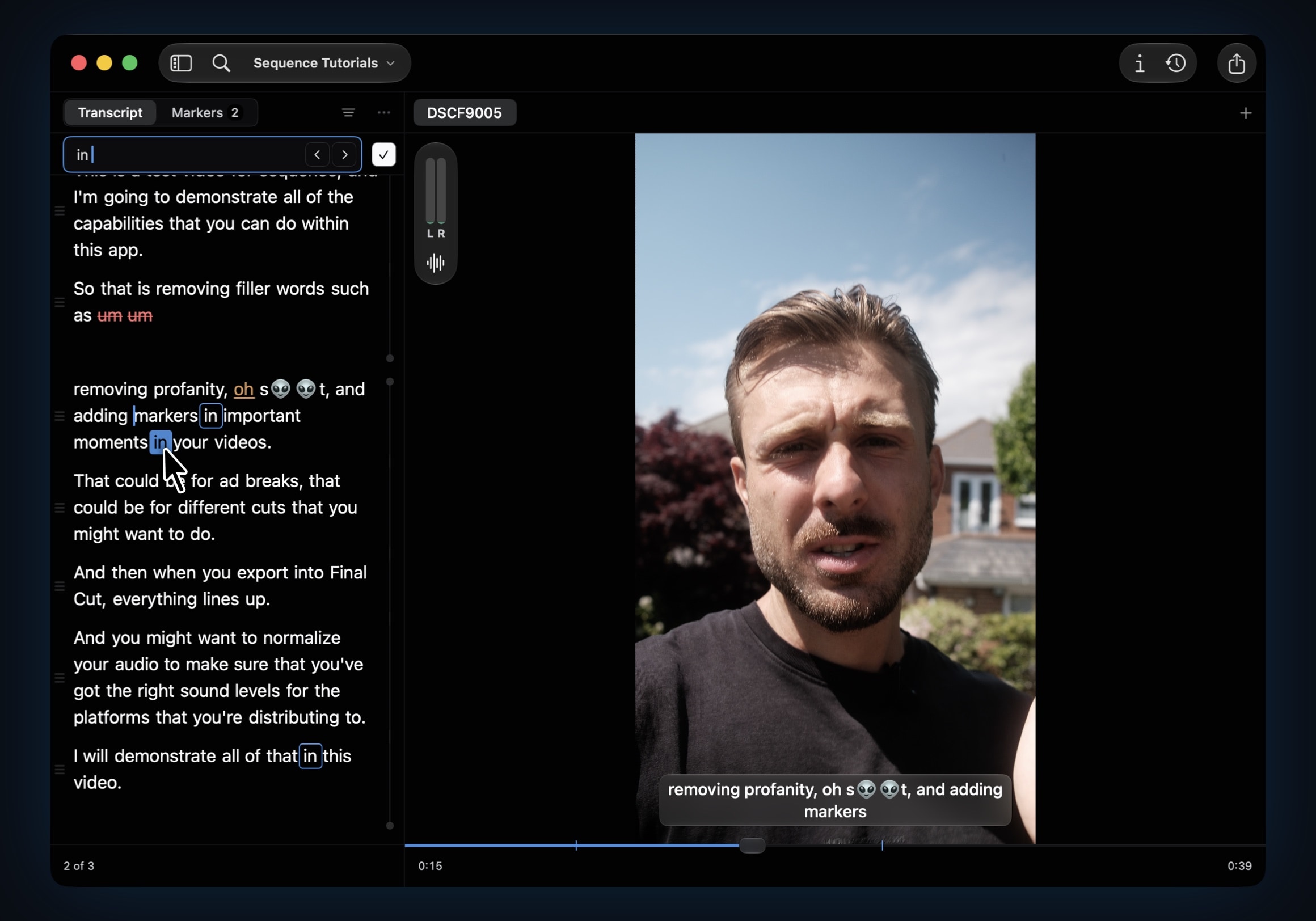
Using Find Within to search for key moments.

The same principle that makes text-based editing faster for podcasters applies just the same here. If you're building clips to share from a three-hour awards ceremony, scanning a transcript is insanely faster than scrubbing a timeline.

With Sequence, you import your media and run the transcription (on-device - no cloud). You get a full searchable transcript of everything said. From there use Find within Transcript (⌘⌥F) which lets you jump directly to any word or phrase instantly. For awards coverage, that means finding every presenter introduction, every key moment, every clip you need, in seconds, not hours.

The Profanity Filter

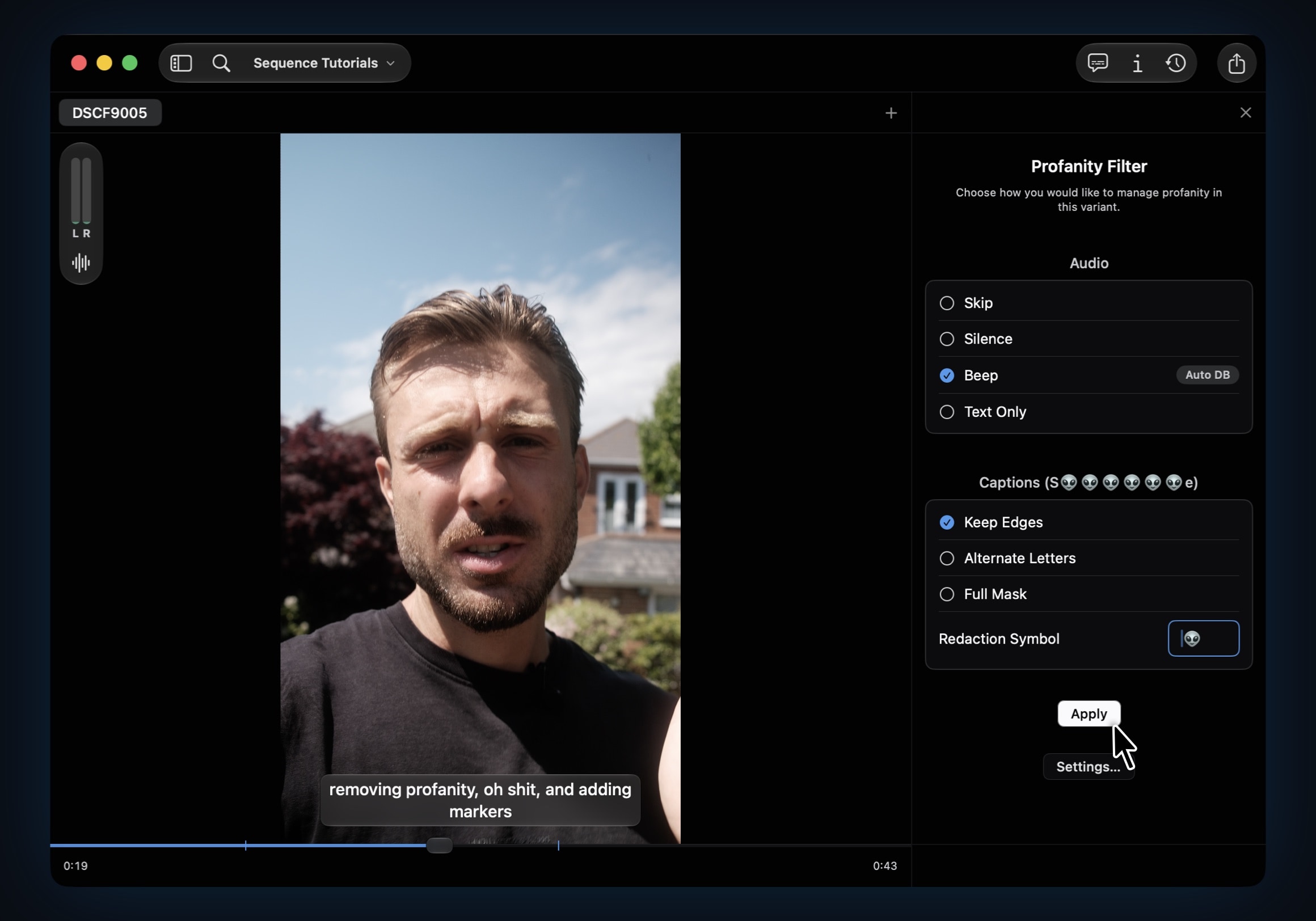
Applying a profanity filter with custom redaction style.

Here's where it gets directly relevant. Sequence ships with a profanity filter built into the transcription workflow.

Once your transcript is ready, Sequence flags profane words automatically. The app comes with a default list, a solid base that covers the obvious, but the list is up to you - you can remove or add your own.

For something like awards coverage, where you might need a family-friendly cut for a daytime audience and an unfiltered version for late-night, that flexibility matters.

And crucially, it's not a blunt removal tool. That's why it's called a profanity filter, not a profanity delete button. For each flagged word, you choose:

  • Remove it completely - the word is cut from the audio, clean and gone
  • Silence it - the audio drops out at that moment, leaving the natural gap
  • Beep it - the classic broadcast treatment, one click

That single choice, applied across an entire piece of content automatically, turns what used to be a tedious frame-by-frame edit into a clean timeline in a matter of seconds. Across multiple clips, that's a huge time saver.

Captions Don't Have to Be Complicated

Short-form content from awards shows almost always needs captions. It's one of the most consistent patterns in modern content creation, you're building clips for Instagram, TikTok, YouTube Shorts, and captions aren't really optional anymore.

Sequence handles the redaction style in captions too. When you export to Final Cut Pro or DaVinci Resolve, the caption titles carry your chosen redaction style with them. If you want asterisks, you get asterisks. If your brand uses a specific emoji or a custom character via Apple's Character Viewer, it carries through to every flagged word in every caption on export.

Some editors keep the profanity in the audio, it can feel more authentic, more in the moment, but want the captions on screen to read clean. Sequence handles that too. The audio and caption redaction choices are independent, so you can have the raw audio alongside neat on-screen text, or a beeped track with fully asterisked captions. Whatever the brief calls for.

Silence Isn't Nothing

One thing worth knowing about how Sequence works under the hood: when audio is analyzed on import, it builds a profile of the sound in your file, including which sections are silent. Genuine dead air, gaps between sentences, pauses mid-thought.

That feeds directly into silence removal, another one-click tool inside the app. For a post-ceremony interview clip full of pauses, or a panel discussions that needs tightening before it goes out, silence removal trims that automatically. It's the kind of thing that quietly saves you even more minutes per clip without you having to think about it.

Export and Finish

For awards coverage, for podcast editing, for any content that needs turning around under pressure, Sequence helps you reach the rough cut faster.

Sequence handles the transcription, the profanity filter, the caption redaction, the silence removal, and the filler word cleanup. When you export into Final Cut Pro or DaVinci Resolve, you're not starting from scratch. You're adding the polish: the graphics, the music, the branding, the feel.

The incidents at the BAFTAs and the Grammys will keep happening. Live events are unpredictable by nature, and right now Sequence lives in the post-production stage, helping editors clean things up quickly after the fact.

The need for smarter content tools is proven. When the unpredictable happens, it's good to know the edit doesn't have to be slow because of it.

Sequence Tool social media preview graphic

James Seddon, Founder

Create What Matters

Transcribe, normalize audio, remove fillers, and clean-up profanity entirely on-device. One-time purchase for two devices.

Read more